
How to Adjust Your Monitor to Stop Shoulder Burning

It hit me like a ton of bricks one evening after hours at my desk—an intense burning sensation in my shoulders that made even the simplest tasks unbearable. I was slumped over, neck strained, shoulders aching, and it felt like I was carrying the weight of the world on my back. That uncomfortable moment sparked a lightbulb—my monitor wasn’t just a screen; it was a culprit subtly sabotaging my comfort and health. If you’ve ever experienced that nagging shoulder burning during your workday, you know what I mean. Today, I want to share how a simple tweak in your monitor setup can be a game-changer. We’re going to dive into practical, easy-to-implement adjustments that can drastically reduce or even eliminate shoulder discomfort, so you can work longer and more comfortably.
Why Your Monitor Placement Could Be Causing Shoulder Pain
Many folks overlook the impact of their workspace ergonomics until pain forces them to stop. I made this mistake early on—ranking my monitor setup low on my list of priorities. I thought just sitting upright was enough, but the truth is, your monitor’s position directly influences your posture. When the screen isn’t aligned properly, you tend to hunch forward, strain your neck, and lift your shoulders in an attempt to see better. Over time, this results in muscle tension, fatigue, and the infamous burning in your shoulders. According to experts, maintaining a neutral head and neck position reduces strain on your musculoskeletal system and prevents discomfort (source: Understanding the link between poor posture and chronic back pain).
If you’re like me, you might have initially placed your monitor too low, too high, or off to the side—mistakes that slowly sabotage your comfort. The good news? Adjusting your monitor doesn’t require costly equipment or a complete workspace overhaul. It’s about fine-tuning your setup and being mindful of your posture.
Let’s walk through some simple steps to get your monitor in the perfect position. These adjustments can help you breathe easier, lift less, and work pain-free—even on those long days at your desk.
Are you tired of that burning shoulder feeling creeping up during your work hours? If so, you’re in the right place. Up next, I’ll show you exactly how to set your monitor for lasting comfort and better posture.
Adjust Your Monitor Height for Natural Posture
Start by positioning your monitor so that the top of the screen is level with your eyes. Sit back in your chair and look straight ahead—your eyes should naturally fall on the upper third of the screen. When I finally set my monitor so that I didn’t have to tilt my neck or crane forward, I noticed a significant reduction in shoulder tension within days. Use a stack of sturdy books or monitor risers if needed to achieve this ideal height.
Secure Your Viewing Angle
The monitor should be directly in front of you, about an arm’s length away. If the screen is off to the side, you’ll tilt your head or turn your body repeatedly, causing shoulder strain. I recall moving my monitor directly in front of my keyboard, which instantly improved my posture. Consider adjustable arms for flexible positioning.
Align Your Monitor for Minimal Neck Strain
Position the monitor so that you don’t need to look up or down excessively. The ideal setup has the screen at a 90-degree angle to your line of sight. When I shifted my monitor from a desk corner to a centered position, my neck and shoulders relaxed noticeably. This simple tweak helped prevent the habitual forward hunch that causes muscle fatigue.
Manage Screen Tilt and Brightness
Adjust the tilt so that glare and reflections are minimized, which often leads to leaning forward or tilting the head. Brightness should match ambient lighting to reduce eye strain. I experimented with different brightness levels until my eyes felt comfortable, reducing the tendency to lean in closer. These small adjustments protect your shoulders from overexertion.
Set Up Ergonomic Accessories
Use a monitor stand or adjustable arm to achieve the proper height and angle. If your monitor is too low, placing a stand can prevent you from hunching forward. I once used a stack of old textbooks before switching to an ergonomic stand—big difference in neck comfort.
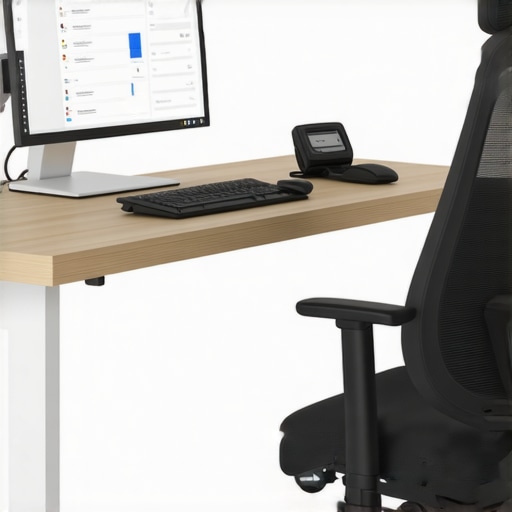
Here’s an example of a properly aligned monitor setup, with the screen at eye level and no need to tilt or crane your neck.
Maintain Consistent Posture During Work
Once your monitor is correctly positioned, focus on maintaining a neutral posture. Keep your shoulders relaxed, elbows close to your sides, and feet flat on the ground. Take regular breaks to stretch or walk around. I set a timer and stood up every 30 minutes, which kept my shoulders from tense over long hours while enhancing flexibility. Proper monitor positioning combined with mindful posture drastically lessened shoulder ache.
Utilize Support and Mobility Exercises
Strengthening shoulder and back muscles helps support proper posture. Incorporate simple exercises like shoulder rolls, back extensions, or the wall angel (see how here: Wall Angel Exercise). I dedicated 5 minutes daily to these moves, which made my shoulders less prone to fatigue and pain associated with poor monitor setup. Remember, these small habits reinforce your ergonomic improvements and help prevent discomfort.
Many people believe that back, neck pain, and sciatica are straightforward issues caused simply by injury or poor posture, leading them to focus solely on stretching or strengthening exercises. However, the truth is more complex. One common misconception is that pain always indicates damage that needs fixing; yet, research shows that pain sensations often persist long after tissue healing (source: Back Pain Breakthroughs). This can trap individuals into endless stretches or aggressive workouts that might worsen their condition. A subtle nuance most miss is the importance of neural sensitivity: hyperreactive nerves can amplify pain signals independent of structural issues, making symptoms seem worse than they are.
Why does nerve hyper-sensitization cause more pain, even when tissues heal?
Neural sensitization involves changes in the nervous system that heighten pain perception—this process is often overlooked in traditional treatment. Studies indicate that central sensitization plays a significant role in chronic back and neck pain (see: Unlocking Mobility) and requires strategies beyond physical therapy, including education and neuro-modulation techniques. Equally critical is understanding that pain must be managed as a symptom, not just a sign of tissue damage. This awareness prevents the trap of over-focusing on symptomatic relief through repeated stretching — which can sometimes increase nerve irritability. Being mindful of neural contributions helps tailor interventions that address the root causes rather than just the symptoms. Recognizing these nuances can dramatically alter your approach and accelerate recovery. Remember, persistent pain often reflects a complex nervous system response rather than just structural issues. So, next time you’re tempted to push through pain with more stretches, consider the possibility of nerve sensitivity; consulting experts who understand these advanced concepts can save you from wasting time or worsening your condition. Do you ever fall into this trap? Let me know in the comments. Want practical techniques to calm nerve pain? Explore proven methods for neck relief here: Revitalize Your Neck and for sciatica, check out Conquering Sciatica. Addressing neural factors alongside physical causes offers a comprehensive path to true relief and lasting mobility.Once you’ve optimized your workspace and adopted mindful movement practices, the next step is ensuring these habits stick over time. Equipping yourself with reliable tools can make a significant difference in maintaining mobility and preventing setbacks.
A crucial tool I personally swear by is a high-quality lumbar support cushion. I opt for the “Everlasting Comfort Memory Foam Back Cushion” because it contours perfectly to my lower back, promotes correct spinal alignment, and is portable enough to use at work or in your car. Using such a cushion consistently has helped me sustain proper posture through long hours, reducing the risk of chronic back pain.
For digital ergonomics, I recommend employing posture reminder apps like “Upright GO,” which utilize gentle vibrations to prompt you to correct your position throughout the day. I integrate this technology into my routine, especially during extended computer sessions, to keep my back and neck in optimal alignment. These real-time alerts foster awareness and help forge lasting habits.
In terms of movement and rehab, investing in a versatile foam roller can be transformative. I particularly use a 36-inch “TriggerPoint Grid Foam Roller” for self-myofascial release. Regularly rolling my upper and lower back alleviates muscle knots that contribute to lingering discomfort and stiffness. Incorporating daily foam rolling sessions prevents the accumulation of tension, especially if you spend lots of time at a desk.
Looking ahead, I believe wearable technology will play an even greater role in back health management. Devices capable of monitoring posture, movement, and muscle activity will become smarter, offering tailored feedback and personalized routines. Such innovations could revolutionize how we sustain mobility in a world increasingly reliant on technology.
### How do I keep my back healthy over years?
Maintaining long-term back health hinges on consistency. Schedule daily reminders to check your posture, integrate targeted strengthening and mobility exercises into your routine, and use supportive tools like ergonomic cushions and posture apps. Remember, small, sustained actions beat sporadic intensity.
Want to dive deeper? For quick relief methods that fit seamlessly into your busy schedule, check out these effective home remedies. And for expert-backed strategies to enhance your mobility, explore simple exercises that make a difference. Staying proactive today ensures fewer setbacks tomorrow—don’t wait for pain to slow you down.
What I Never Saw Coming About My Pain Journey
One of the most profound lessons I learned was that persistent back discomfort often points to neural sensitivities, not just muscular strain. Early on, I focused solely on stretching and strengthening, overlooking how nerve hyperreactivity amplifies pain signals, making recovery feel impossible. Recognizing this shifted my entire approach, guiding me toward neuro-focused therapies that finally made a difference.
Why Relying Only on Quick Fixes Can Backfire
I used to believe that immediate relief through topical creams or passive treatments was the answer. However, I discovered that sustainable healing requires addressing underlying posture habits and neural factors. Quick fixes might mask symptoms temporarily, but genuine progress demands consistent ergonomic adjustments and active engagement in movement strategies.
Becoming Your Own Ergonomic Detective
After years of trial and error, I realized that the key to long-term back health lies in becoming aware of how subtle workspace tweaks can dramatically reduce strain. Moving my monitor to eye level, adjusting my chair, and incorporating regular mobility breaks transformed my daily experience, proving that small, intentional changes outweigh brute-force therapy.
Curated Resources That Changed My Perspective
- Back Pain Breakthroughs: This book unveiled the complex nervous system aspects of chronic pain, helping me understand that recovery isn’t just physical but neurological. It’s a must-read for anyone feeling stuck in their healing journey.
- TriggerPoint Grid Foam Roller: My favorite tool for releasing muscle knots and improving flexibility. Its versatility makes it an essential part of my ongoing maintenance routine.
- Upright GO Posture Reminders: This app-friendly device keeps me aware of my posture throughout the day, turning awareness into habit—a crucial step in pain prevention.
- Expert-led online programs: Courses focusing on neural health and ergonomic mastery have equipped me with techniques beyond basic stretching, emphasizing the importance of addressing nervous system sensitivities.
Your Next Step Begins Today
Remember, lasting relief and improved mobility come from informed, consistent actions. Embrace these insights, adapt them to your life, and watch your back and neck health flourish. The journey to pain-free living is ongoing, but every small step builds toward a stronger, more resilient you. Are you ready to make that change and reclaim your comfort? Share your biggest challenge below and let’s tackle it together!
For more personalized guidance, don’t hesitate to reach out. Your better back starts now.