
Why your laptop stand might be making your neck knots worse

I was sitting at my kitchen table, nursing a cup of lukewarm coffee, when I realized I couldn’t actually turn my head to see who had just walked into the room. My neck was locked solid. I’d been using one of those trendy, elevated aluminum laptop stands for three weeks, convinced I was finally “doing ergonomics right.” But instead of feeling like a productivity god, I felt like a rusty Tin Man. It’s a frustrating, visceral kind of pain that starts at the base of your skull and radiates down into your shoulder blades until every breath feels restricted. We’re often told that raising the screen is the holy grail of office health, but the reality is much messier when we don’t look at the whole picture. Today, I want to show you why your current setup might be backfiring and how to actually find relief without throwing your laptop out the window.
Why Your “Perfect” Setup Is Creating a Tension Trap
I’ve been there—rubbing my traps while staring at a piece of gear that promised me comfort but gave me a knot the size of a golf ball. The biggest mistake I made, and maybe you’re doing it too, was thinking that height was the only variable that mattered. I cranked that stand up until the webcam was at eye level, but I kept typing on the laptop’s own keyboard. My arms were reaching up at a 45-degree angle just to reach the keys. Within two days, the knots in my neck weren’t just “tension”; they felt like literal marbles under my skin. This happens because when you reach upward, your shoulders shrug naturally, which is a fast track to neck pain and stress. I’ve learned the hard way that how to set up your laptop for better spine protection involves much more than just elevation. If your elbows aren’t at your side, your neck is paying the price.
Is a laptop stand actually worth the hype?
You might be skeptical, and honestly, you should be. If these stands are so great, why do they often lead to more trips to the specialist? The truth is, a stand is only half of a solution, and using it incorrectly is worse than not using one at all. When I first started using one, I completely ignored why your wrist position at your desk affects your neck health, and it cost me weeks of mobility. A surprising study published in the International Journal of Environmental Research and Public Health found that using a laptop on a stand without an external keyboard actually increases strain on the neck and upper trapezius muscles compared to a standard desktop setup. It turns out, by trying to fix our “text neck,” we often accidentally create what I call “reach neck.” Have you ever spent money on an ergonomic chair or a fancy stand only to feel worse after a week of using it? You aren’t alone, and it usually isn’t the gear’s fault—it’s how we integrate it into our daily flow. Understanding the 15 degree rule for your computer monitor to save your neck can be a total game-changer. Let’s look at the mechanical reasons your body is fighting your new setup and how to fix it before those knots become permanent fixtures.
Get Your Hands Back Down to Earth
I’ve learned the hard way that the first rule of laptop survival is the separation of powers: your eyes and your hands should never be competing for the same piece of plastic. When you use a laptop stand, you must—and I mean absolutely must—use an external keyboard and mouse. Think of your arms like heavy pendulums; they want to hang naturally by your side. When you reach up toward an elevated stand, you’re essentially asking your trapezius muscles to hold up the weight of your arms all day long. This is a primary reason why your wrist position at your desk affects your neck health. Last year, I tried to hack a standing desk at a hotel using a stack of coffee table books and a suitcase. I spent four hours typing with my hands at chest level. By dinner, my neck was so tight it felt like a piano wire about to snap. That disaster taught me that if your elbows aren’t bent at a 90-degree angle with your wrists resting flat, your neck is the one doing the heavy lifting.
Find the Sweet Spot for Your Screen
The goal isn’t just to get the screen high; it’s to get it right. If you go too high, you end up tilting your chin up, which compresses the delicate joints at the top of your spine. This is where the 15 degree rule for your computer monitor to save your neck comes into play. You want the top third of your screen to be level with your eyes. Your head weighs about as much as a bowling ball—roughly 10 to 12 pounds. For every inch your head tilts forward or back to see your screen, you effectively double the weight your neck has to support. It’s no wonder how your monitor height is causing those recurring headaches that seem to start right behind your eyes. 
The Ten-Second Reset for Your Shoulders
Even with a perfect setup, your body wasn’t designed to be a statue. Tension accumulates like dust on a bookshelf; you don’t notice it until it’s a thick layer. When I feel that familiar creep of tightness, I use the 10 second wall slide for instant shoulder tension relief. It’s a simple mechanical reset that pulls your shoulder blades back into their proper housing and opens up the chest. If you ignore these micro-breaks, you’ll eventually notice the real reason your neck cracks when you look over your shoulder—it’s your joints screaming for a change in position. By incorporating these shifts, you can revitalize your neck and keep those deep-seated knots from becoming your permanent officemates. Don’t wait for the pain to become a crisis; adjust the height, drop your shoulders, and give your spine the breathing room it deserves.I used to think my back pain was a geometry problem. If I could just keep my spine in a perfectly straight line, the pain would vanish. I was wrong. The biggest myth in ergonomics is that “straight” equals “safe.” In reality, why your straight posture is actually straining your muscles is one of the hardest lessons for people to grasp. When you force a rigid, upright position, you’re creating isometric tension that never lets your stabilizers rest. Your muscles aren’t meant to be steel beams; they’re meant to be dynamic shock absorbers. Most people I see who are obsessed with “sitting up straight” are actually discovering why your perfect upright posture is actually tensing your spine and causing chronic fatigue in the deep spinal extensors.
Are you accidentally tensioning your nerves instead of your muscles?
This is where things get technical. Many of my clients come in complaining of “tight hamstrings” that won’t go away no matter how much they stretch. The “oops” factor here is huge: if that tightness is actually neural tension from the sciatic nerve, traditional stretching is like pulling on a fraying rope. This is exactly why stretching your hamstrings can actually flare up sciatica. You’re not lengthening a muscle; you’re irritating a sensitive nerve. A study in the Journal of Clinical Medicine highlighted that neural mobilization—not static stretching—is the key to resolving this kind of referred pain. If you’ve been aggressively reaching for your toes and feeling a sharp zing rather than a dull muscle pull, stop immediately. You’re likely feeding a fire you should be smothering. #IMAGE_PLACE_HOLDER_C#
The hidden danger of self-adjusting
Another trap is the “pop” addiction. We’ve all done it—twisting the neck until it cracks for that split second of relief. But why cracking your own back is making your joints more unstable is a nuance that most people miss. You’re usually cracking the joints above or below the actual stuck segment, leading to hypermobility in the wrong places. This instability eventually forces your muscles to seize up even harder to protect the joint. It’s a vicious cycle that often starts with the breathing habit that is keeping your back muscles tight. If you aren’t using your diaphragm, your neck muscles have to lift your ribcage every time you inhale. That’s 20,000 extra reps of neck work every single day. You also have to look downstream. I’ve seen cases where chronic neck tension was actually a compensation for a lack of stability in the feet. For instance, how a stiff ankle is actually causing your recurrent lower back aches is a fascinating deep dive into the kinetic chain. If your ankles can’t flex when you walk, your pelvis tilts, and your neck has to crane forward to keep your eyes on the horizon. Have you ever fallen into this trap? Let me know in the comments.
Ditch the standard keyboard to save your shoulders
I spent years fighting my own anatomy before I realized that my keyboard was the enemy. A standard rectangular keyboard forces your wrists to angle outward and your shoulders to roll inward, creating a collapsed chest. To combat this, I switched to a split ergonomic keyboard. By separating the two halves, I can keep my hands in line with my shoulders, which naturally pulls my shoulder blades back and down. This is one of those mobility mastery daily tips to keep your spine and joints healthy that people often overlook because it requires a bit of a learning curve. I also swapped my traditional mouse for a vertical one, which keeps my forearm in a neutral ‘handshake’ position. This prevents the micro-rotations in the elbow that eventually tug on the nerves leading up to the neck. If you are serious about revitalizing your neck, you have to look at the tools you touch for eight hours a day. 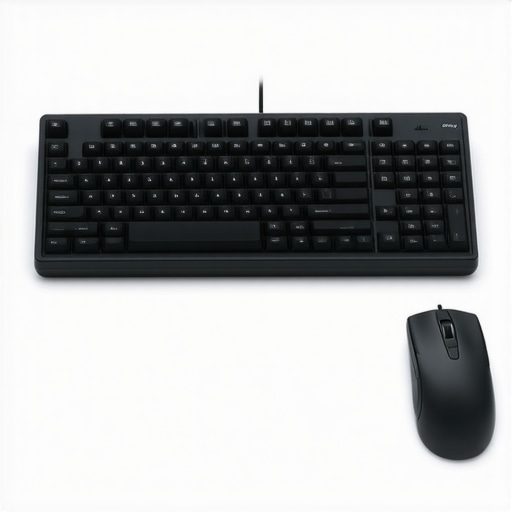
How do I keep my spine from reverting to a pretzel?
Maintaining these gains isn’t about one marathon session of stretching; it’s about the frequent, tiny wins. I use a simple interval timer that pings every thirty minutes. When it goes off, I don’t just stand up—I perform a ‘movement snack.’ This might be a quick set of shoulder rolls or the 30 second ankle drill that reduces your risk of back injury. As Dr. Stuart McGill, a world-renowned expert in spine biomechanics, notes in his technical research, the goal is to build spinal endurance rather than just raw strength. Your stabilizers need to know how to stay ‘on’ without fatiguing. This consistent maintenance prevents the slow creep of tension that leads to those Friday afternoon headaches. I’ve found that even on my busiest days, these 30-second resets are the difference between finishing the day feeling energized or feeling like I need a week-long nap.
Smart chairs and the future of spine health
Looking ahead, I think we are moving away from passive furniture and toward active biofeedback. We are already seeing the rise of wearable sensors that vibrate when your head drifts too far forward, and I expect unlocking mobility expert tips on managing back pain in 2025 will focus heavily on AI-driven workstations that adjust their own height based on your fatigue levels. Until those become affordable, the best tool you have is your own breath. I highly recommend you try how a simple reach and breathe move can decompress your back right now. It takes less than a minute and resets the pressure in your thoracic spine instantly. Don’t let your gear do all the work—your body needs to remain an active participant in its own health.
Lessons I Learned While Fighting My Own Anatomy
Reflecting on my journey from a locked neck to fluid movement, I’ve realized that movement is medicine, but only if you move correctly. One of the biggest shifts for me was recognizing why your straight posture is actually straining your muscles. I used to think I had to be a rigid board, but that just created more tension. I also had to accept that understanding the link between poor posture and chronic back pain isn’t just about how you sit, but how often you change your position. Finally, I learned that the truth about cracking your own knuckles and neck is that self-adjusting often provides a temporary dopamine hit while making your joints less stable in the long run. Real relief comes from stability and controlled motion, not just chasing a satisfying pop.
The Few Tools I Truly Swear By
If you’re looking to build your own ergonomic sanctuary, start small and prioritize tools that facilitate natural alignment. I personally rely on a split mechanical keyboard to keep my chest open and my shoulders from rolling forward. This is essential to enhance your back mobility and ergonomic comfort throughout the day. I also suggest keeping a tennis ball at your desk; how a tennis ball can relieve deep glute and sciatic pain is a trick I use during long calls to keep my lower half from seizing up. If you want to dive deeper into the science of why we hurt, I highly recommend the works of Dr. Stuart McGill—his research helped me see back pain breakthroughs as a marathon of small, smart choices rather than a quick fix.
Take Control of Your Spinal Future
You don’t have to live with a neck that feels like it’s made of lead. By making these small adjustments—lowering your hands, finding your eye-level sweet spot, and respecting your neural tension—you are reclaiming your health. Remember that neck pain solutions are often found in the habits you repeat every single hour. Don’t be afraid to look a little ‘weird’ at the office by standing up to do a wall stretch or switching to a vertical mouse. Your future self, free from neck pain and stress, will thank you for the effort you put in today. #IMAGE_PLACEHOLDER_E# Have you ever tried an ergonomic laptop stand only to find it made your neck feel tighter than before? Let me know your experience in the comments below!